
 Yulia Lytvyn
Authors: Marta Bobyk and Solomiya Kubinska
The new era of Conversational AI and Automation is here – are you with us?
Intro: be further than your market competitors
Despite the abundance of exciting business ideas and various startups, the 21st-century world is still in the deceptive belief that 24 hours are enough. Enough to provide a brilliant service to your clients. Enough to manage your team properly. Enough to gather feedback from the clients, analyze the statistics, carry out improvements, constantly evolve, and … more and more.
But that’s not the reality. To keep pace with the 21st century and be even further than your biting competitors – any business requires smart digitalization and well-timed automation. In fact, a chatbot is one of the most relevant and technologically powerful ways to fulfill the fair desire to be able to solve daily tasks lightly and effectively.
You may ask, why have chatbots become so popular amongst successful business people? Well, there is more than one ground.
Why chatbots?
First of all, chatbots are user friendly indeed: available 24/7, easy to use, containing clickable buttons, chat-memory, and requiring one single click to start. As a result, your clients can find the answers to the ever-conceivable question in just a few clicks. Even if it doesn’t exist – why not connect the manager in ONLY this specific case. Saves time, agree?
Secondly, the rapid development of nowadays technologies made it possible to exchange data from different sources in one place. This provides humanity with a great opportunity to gather and read various data, that not only extends clients’ awareness but also brings recognisability and recognition to your service. For instance, the chatbot for your hotel may send a notification with weather conditions a day before the client’s arrival. Or ask if they would like to order a morning coffee, taxi, city excursion, whatever to have the best comfortable trip ever.
Finally, it should be stressed that chatbots are easy and cheap in implementation – the user only needs to download the particular messenger (if they don’t already use it) and open the bots page. Chatbots are accessible from all devices like smartphones, computers, and tablets. To sum up, the new era of Conversational AI and Automation is here – are you with us?
What tools to use?
Nevertheless, great solutions require great tools. So, there are dozed of platforms that assist in:
– proper configuration of the chatbot and its stages
– wiring together APIs and online services
– management conversations in a flexible graphical interface
– satisfying CI/CD requirements
The list of platforms is huge – basically, they vary in complexity, pricing, and availability of advanced features – for example, a built-in NLP engine or Voice-To-Text//Text-To-Voice converter. However, all of them have a single common feature – any platform is user friendly indeed: as a matter of fact, their UI is easy-readable by people with little or even no technical experience.
So, as a product owner, you are always able to get a high-level visual explanation of chatbot “algorithms” such as clients’ registration process or how chatbot handles FAQ. Essential to highlight that building stable and successful products require a profound comprehension of the full development cycle – that starts with defining product requirements together with BA (business analyst) and continue with developers’ expertise, QA engineer verifying the product grade, and DevOps making chatbot alive.
Consequently, the platforms are used either for self-education to build mock (pet, home) projects or more seriously and responsibly – to release their own market-leading product with a professional team.
Obviously, an enduring and technically rich experience has brought us chances to sample lots of tools and concepts to find out the best approaches for our clients. In this particular article, we are going to compare two: Cognigy and Node-RED.
Disclaimer: at the end of this article you’ll find the summary comparison table that summarises all the content below.
Cognigy vs Node-red: Pricing and installation
In the first place, we should specify that Node-RED is the open-source free software that all developers can access by downloading it from the official website. To run this software locally the supported version of Node.js is required since Node-RED itself can be installed globally by a single npm command :
$ sudo npm install -g --unsafe-perm node-red
To start using the platform – write $node-red in the terminal and reach localhost:8080 to see the workspace of your first project.
Moreover, Node-RED can be also instantly accessed by the Web – no Node.js pre-installation required in this case. As one of the ways – use IBM Cloud and it’s Start Kit to kick off. Using IBM Cloud you are able even to deploy your app, but be cautious – IBM has a limit on the number of apps available for the free plan. As a Cloud alternative: all AWS gurus should feel free and confident to build their Node-RED app with AWS Elastic Beanstalk service. To see the full list of installation guides – go here.
By the way, for IoT fans and anyone who gets addicted to the concept of the smart house – check Raspberry PI: computer explanation and Node-RED installation guide. Finally, check stunning Youtube tutorials and step-by-steps: for example, Node-RED with Home Assistant.
To sum up, Node-RED is free and has installation guides to any taste, technical credibility, and hardware stuff you own.
Related article: How to create a Telegram Reminder Bot Using Node-RED
On the other hand, Cognigy AI is an enterprise conversational automation platform – consequently, it is not free, but positively – offers a free trial to test, compare and decide if the platform meets your needs. Furthermore, you can schedule a demo or join their webinars (e.g. the last one was held due to Cognigy AI v4 release). For today, the vendor has no starting price specified officially – it is individual for every business, its requirements and any kind of scale to be covered. Additionally, Cognigy is presented as a graphical web editor, so it doesn’t require an installation (whatever amount of projects you are going to create and deploy). At this point – it limits you with a chance to play around with programming electricity at home, or more important – fast Cloud integration features.
Given the features that Cognigy offers, the leading role amongst conversational tools is rhetorically explained and the paid plan is apparently justified. The most major ones will be definitely described in the next article paragraphs, and you can delve here to get all.
Cognigy vs Node-red: Interface
- Chains layout
Heretofore, interfaces of both solutions looked very similar in the form of chain(s) of nodes beginning at the left side of the editor page, and logically entailing to the right side. Although, with the release of Cognigy V4 the visual structure of the flows was majorly changed. The regular flow editor was merged with the process flow editor. Besides changes in nodes’ functionality that we will talk about later, now a flow goes from top to bottom in Cognigy v4, and still from left to right in the Node-RED case. Given that in Cognigy v3 flows were going from left to right – we can assume that the Cognigy UI/UX team decided to try to implement another type of visual hierarchy to see if organized content follows natural eye movement patterns better.
- Logging
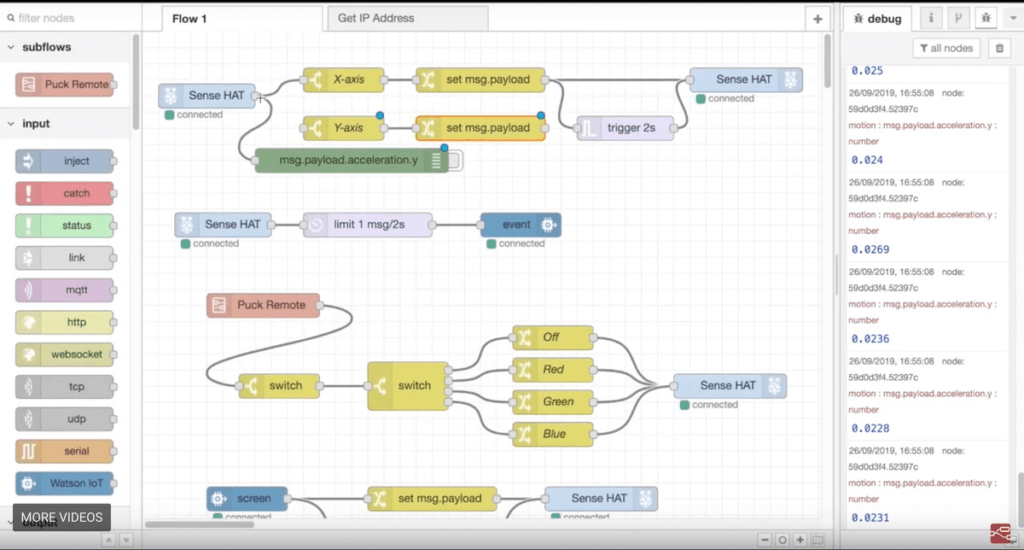
Node-red is a great platform for developers since it contains a lot of useful UI elements for future bot execution and testing. However, it doesn’t have logs the way we use to think about them. First of all, node-red running logs (as flow starting date & time, running server address and clusters) could be found after typing “node-red” in the command line. Next, as described in the documentation, logs can be stored by two other methods. With the help of logger node-red users are able to output logs through the console or send it to any preferable place. Kibana or AWS Cloudwatch are the most popular services to store logs as they are easy to use and look-up through. Moreover, every company can choose the plan that fits best and meets every business requirement.
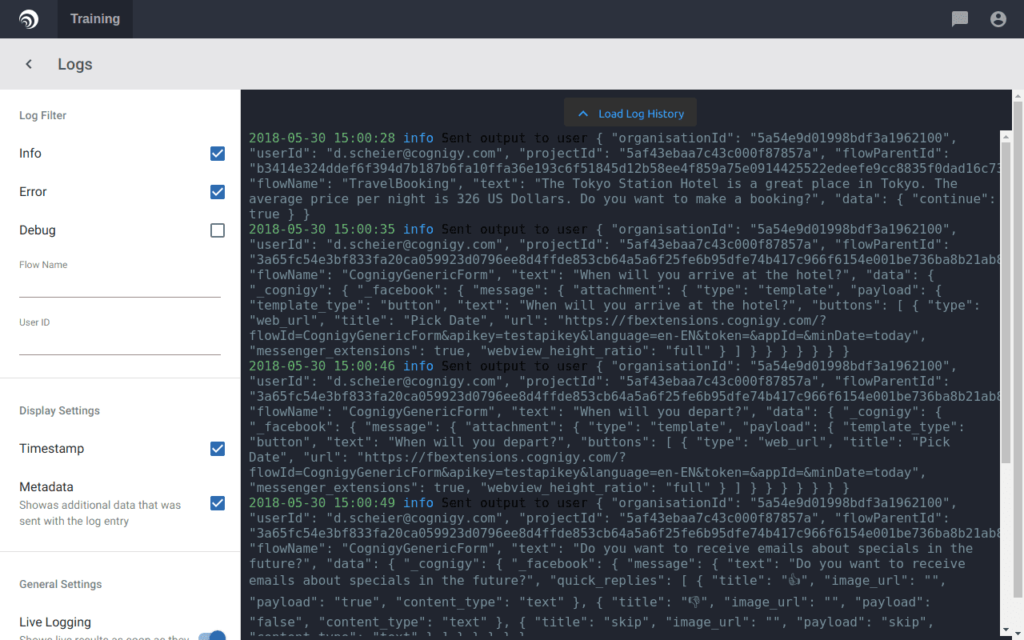
On balance, Cognigy logs can be found on the Projects Dashboard page – select the Logs option. Cognigy account users can follow those logs live, they will be automatically appended when new log outputs are being emitted. Also, they can load the history of log entries that happened before, as well as choose the filters to display/hide entries by log type (info/error/debug) within the sidebar. At the same time – the ability to find logs by specific Flow name or User identifier. Each log entry implies timestamp, level, message, and metadata which opens the log function to the full.
However, some disadvantages still exist — no ability to filter logs by Project ID/Project Name, as well as configure Alerts/Events on, to say, error logs from Registration flow – which will be perfect for the Chatbot development process.
- Chatbot user profile page
What if you would like to overview your chatbot user information and session? Unfortunately, no way to implement this on Node-red UI, if only you don’t add sorting to logs or have the customer Node.js microservice to manage user-related operations.
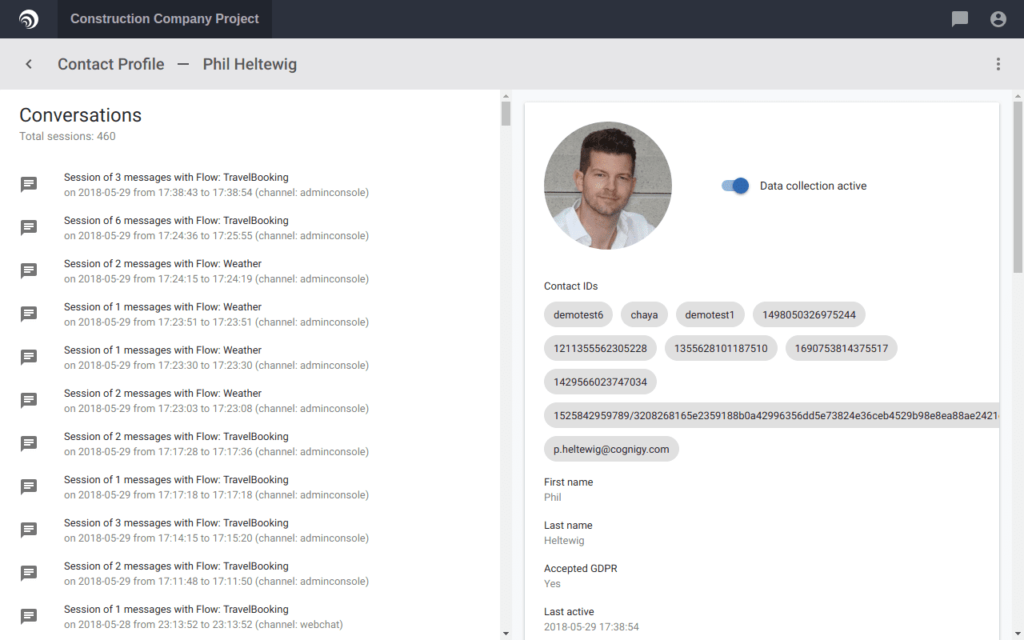
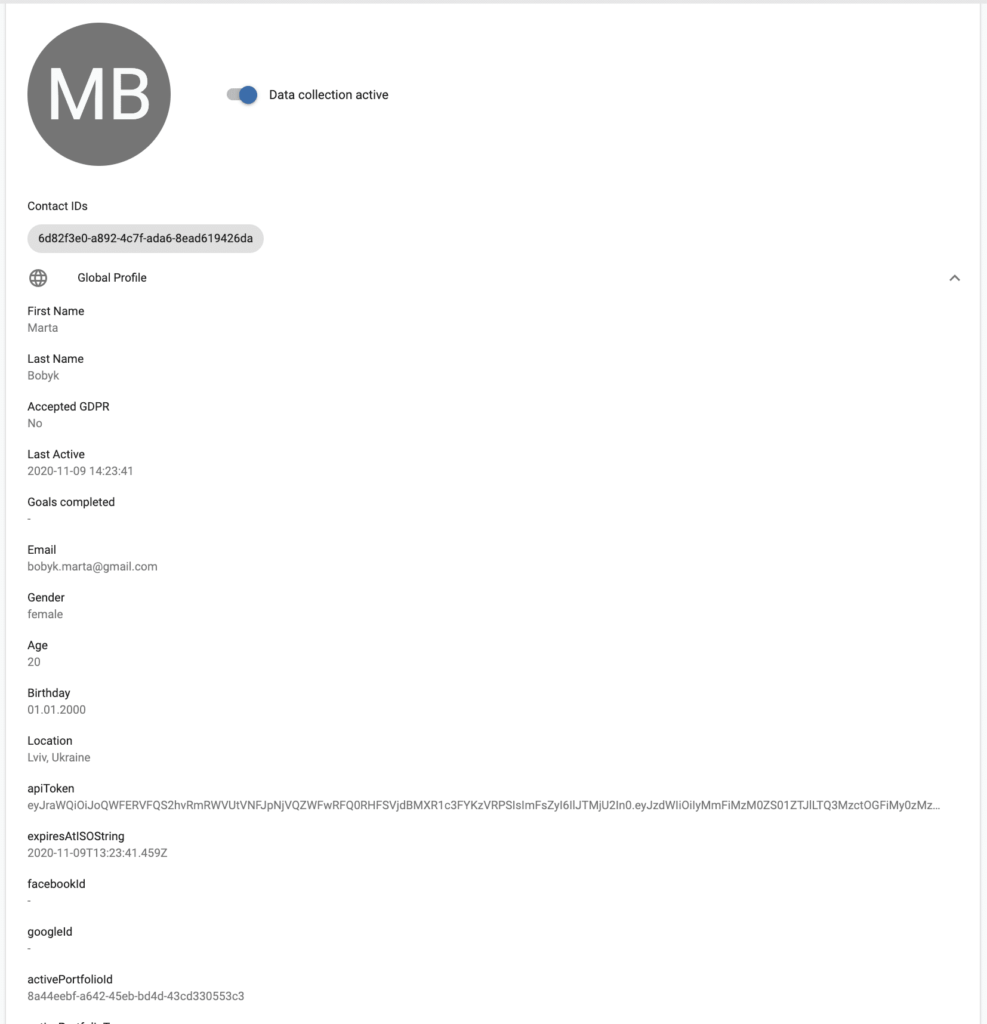
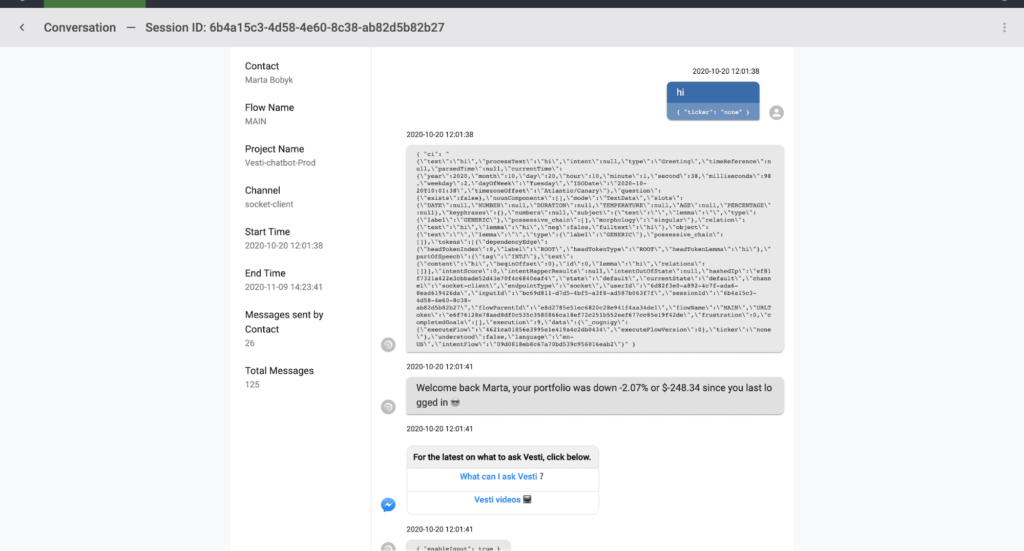
Cognigy has the Contact management feature, which perfects the UI for Business Analyst, Flow developers, and Project Managers. Moreover, Cognigy allows you to add custom fields endlessly, so it undoubtedly speeds the performance up, when it comes to storing API tokens, their expiration time, and other “active” (“warm”) variables. Another enjoyable point – the ability to review and analyze the session(s). Last, but not least, a feature that we find pleasure in – Handover support. This means that a live Project developer or manager may replace the chatbot, communicate with the service user, and turn the AI chatbot back on to continue.
- Access control
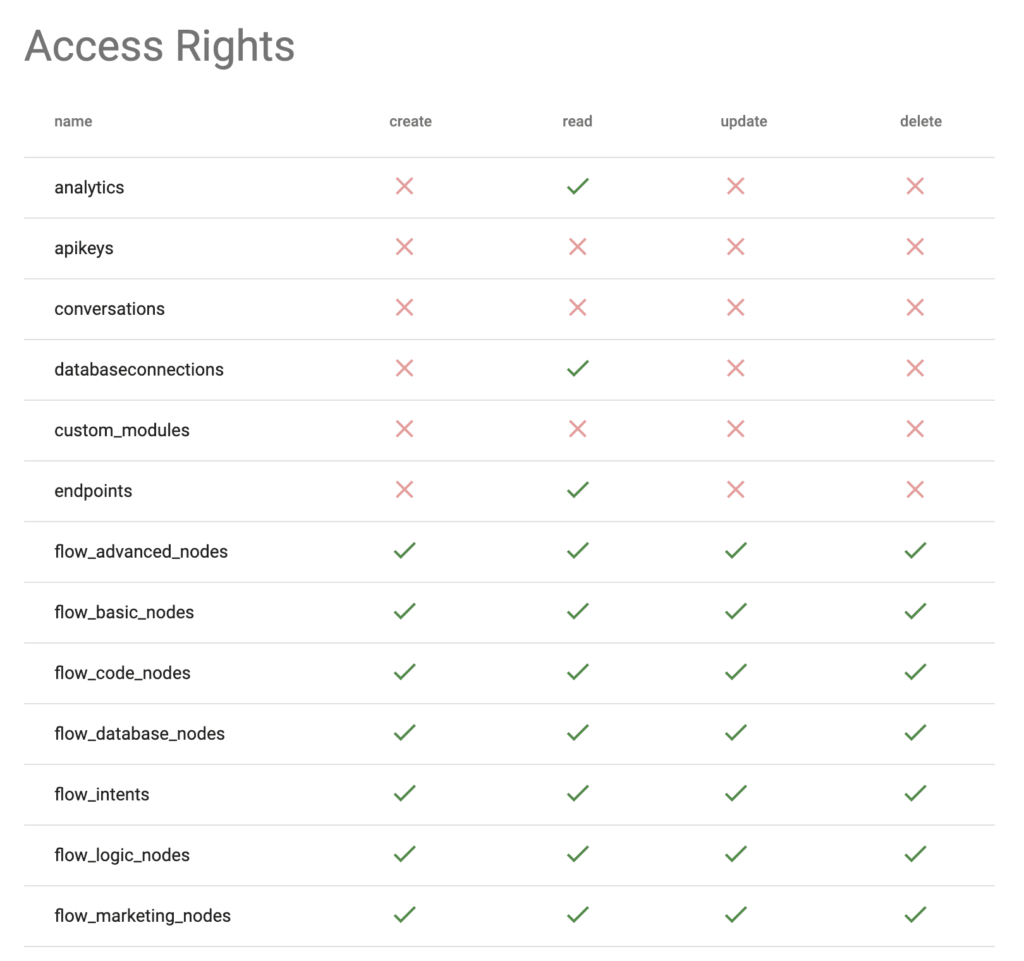
What about the access control page? That’s something that node-red doesn’t require you to have. Node-red editor is accessible and it’s really helpful when you are working on a flow with your colleagues or you have to share your working flow with your boss. However, you should be concerned about your privacy as node-red is a flexible platform that satisfies all needs. As you wish there is a possibility to secure your intellectual property by enabling HTTPS access, securing the editor and admin API or securing the HTTP nodes and node-red dashboard. Node-red documentation presents a step-by-step guide on how to fulfill the security checklist.
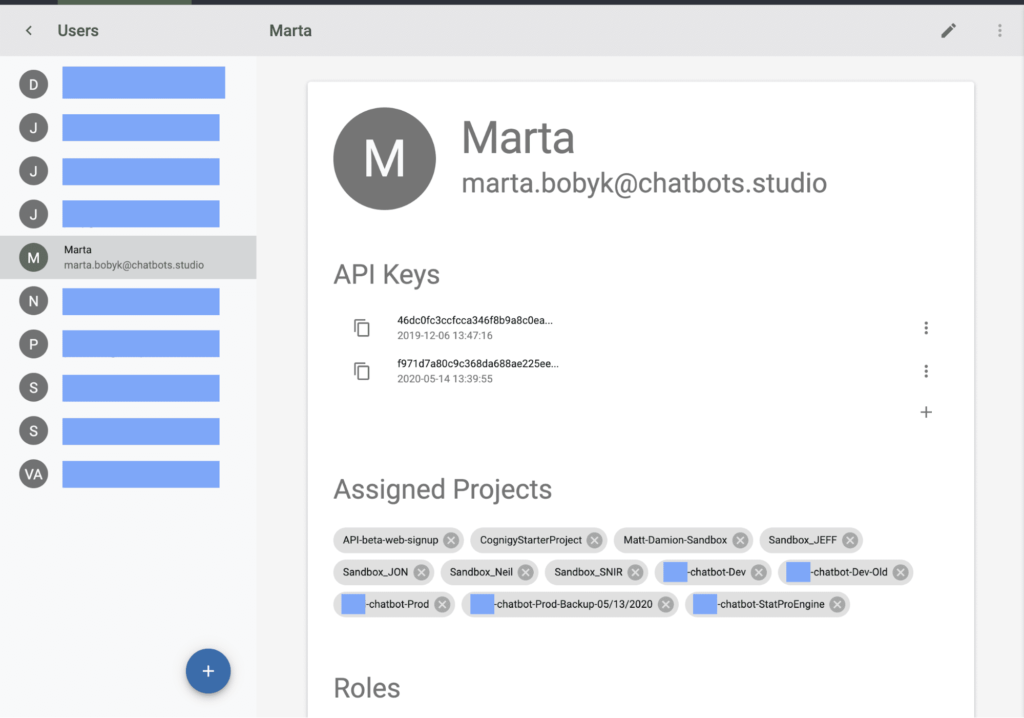
To compare, Cognigy has a throughout Management UI and Access Control page that allows to configure the set of policies to users, as well as sharing options on the projects. Cognigy is able to handle a multi-tenant scenario – these individual tenants are called organizations within Cognigy platform. Each organization has completely separated:
- projects
- users
- API access and keys
- contact profile schemas
- quotas & limits
Having created the organization with global rules, quotes, limits, ability to configure system messages, and more importantly – admin, you are able to play around with access within your team. Full list of access rights you can get here.
The cons we notice while developing chatbot flow – access rights are set per user for all projects attached. This disables the flexibility in terms of allowing platflow users to read/update/delete specific chatbots stages – either all or nothing.
- Debug and info tabs. Versioning.
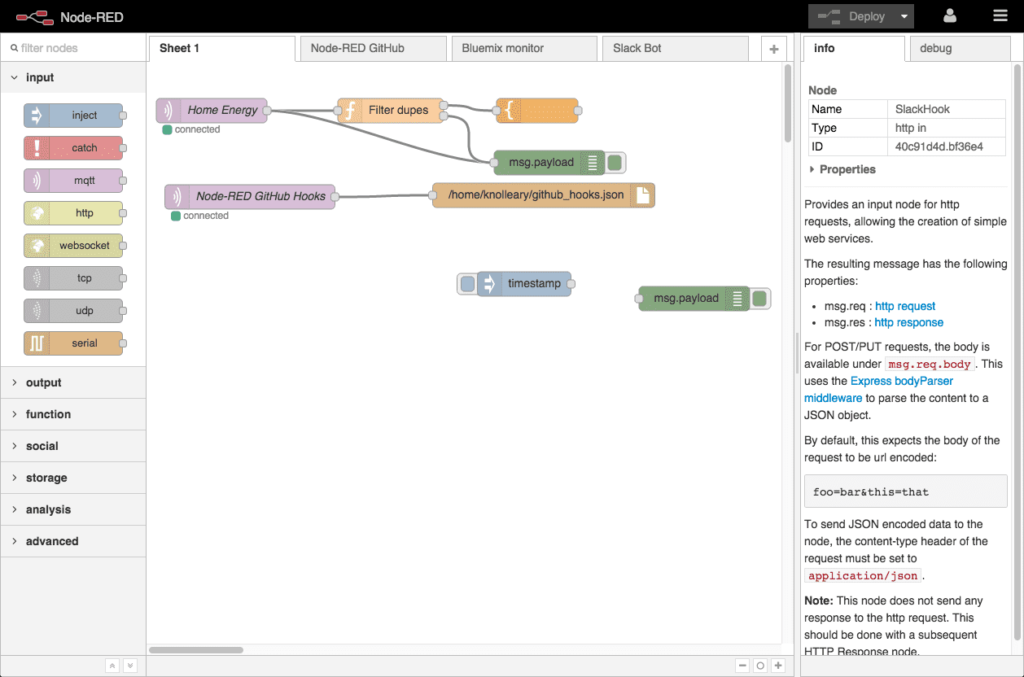
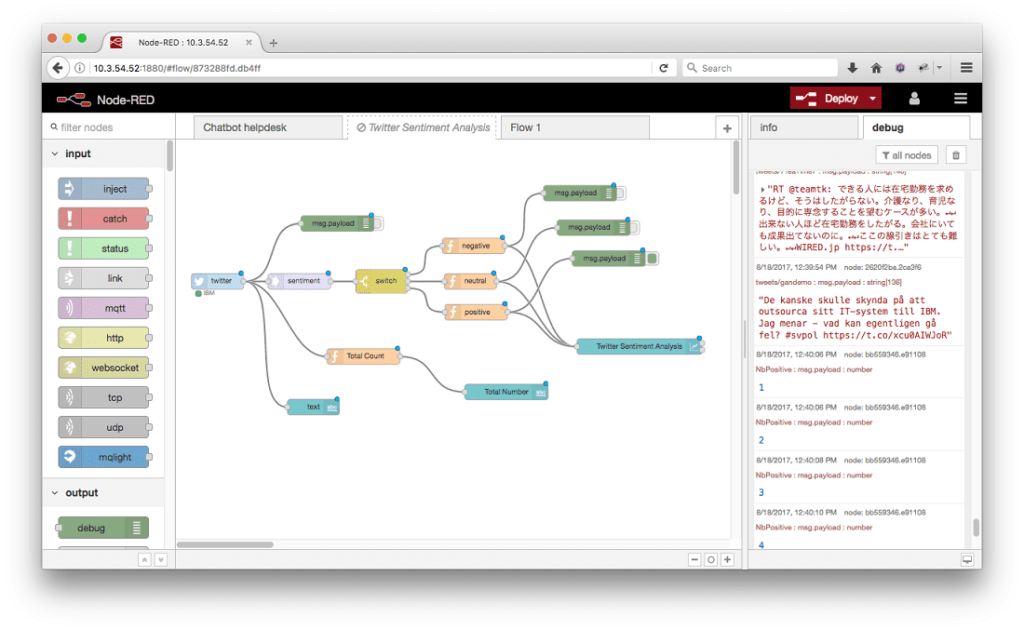
The debug and node info tabs can be found on the right side of the workspace. With the first one, you can test the flow and dive into the output object to improve the project flow. Moreover, Node-RED supports multi-pages for flow editing. For instance, different functional parts of the bot can be located on different pages wired together by link nodes. It makes the process of reading a flow easier because nodes don’t overcrowd the flow editor. Node-RED has no history management and flow versioning, unfortunately.
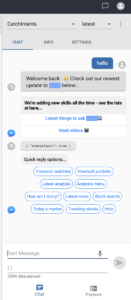
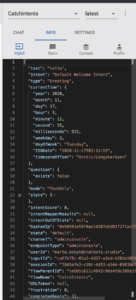
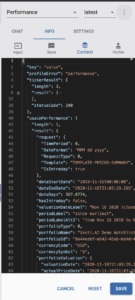
Cognigy has a similar interface, nevertheless, there is no additional tab for nodes – all nodes’ information can be found only directly in Cognigy docs. On the right side, a tab with chat, settings, and info is located – this means that you can test flows right in the editor as well, which is again helpful indeed while developing new features. All visual elements are rendered the same way and even buttons are clickable. Moreover, in the Info tab, you can investigate the current input object, your user profile, and context – in the latter you can check all current flow request responses.
 |  |  |  |
Related article: Top Libraries To Quickly and Nicely build Charts with Javascript
This platform supports multi-flows concept for glueing the project parts – this means that you should:
1) specify the entry flow in the endpoint (connection with the channel: Facebook, web, google assistant, whatever)
2) use Execute/Switch flow blocks to call other flows – which is quite similar to the multi-page concept in Node-red
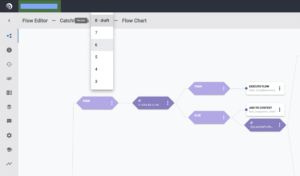
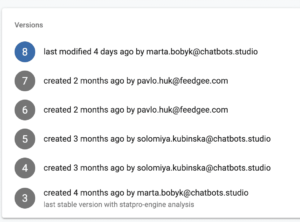
Another great and unique capability is that Cognigy supports the flow versions – to examine flow history and roll back if required. For example, after the new version of a flow is developed – a platform user can press the LOCK VERSION button, so it will save the current version of flow and create a new draft version. Next changes and new features are implemented in the draft version, and there is always an opportunity to roll back to any to edit, choose the flow previous versions in the Execute flow node, or specify a flow version while exporting the project.
 |  |
Cognigy vs Node-red: Nodes
Nodes are the principal part of both platforms’ functionality. They define capabilities and comfortability in the process of chatbot creation.
In Node-RED, one can find all nodes together located in the tab on the left part of the editor. Nodes are sorted by categories:
- Common (inject, debug, complete, catch, status, link in, link out, comment)
- Function (function, switch, change, range, template, delay, trigger, exec)
- Network (mqtt in, mqtt out, http in, http response, http request, websocket in, websocket out, tcp in, tcp out, tcp request, udp in, udp out)
- Sequence (split, join, sort, batch)
- Parser (cvs, html, json, xml, yaml)
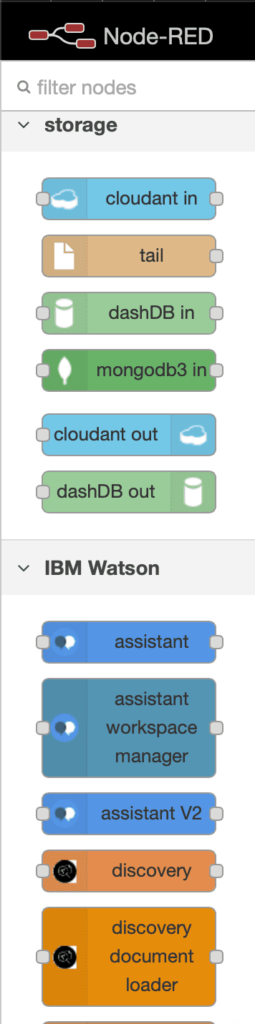
- Storage (file, file in, watch, tail)
Nodes can be added to the workspace editor by either:
- dragging them from the palette,
- using the quick-add dialog,
- or importing from the library or clipboard.
Node-RED has a very flourishing library, as well as it gives the opportunity to personalize flows. For example, if a user has the same number of nodes repeating, he or she is able to create a subflow and instead of a number of nodes, use only one. This feature makes the process of reading and editing the flow much easier and time-saving. Moreover, to fulfill all the requirements of the product owners, developers can create custom nodes with the necessary functions that will improve the performance of the project. It is noteworthy that Node-RED requires other tools to be able to connect to the chatbots, such as Ngrock or Localtunnel. However, this problem can be solved by using custom nodes for a certain messenger. But it’s unlikely to use custom nodes that are not developed especially for your project, as the authors of the nodes have a right to make changes without notifying about it and they could also stop supporting those nodes.
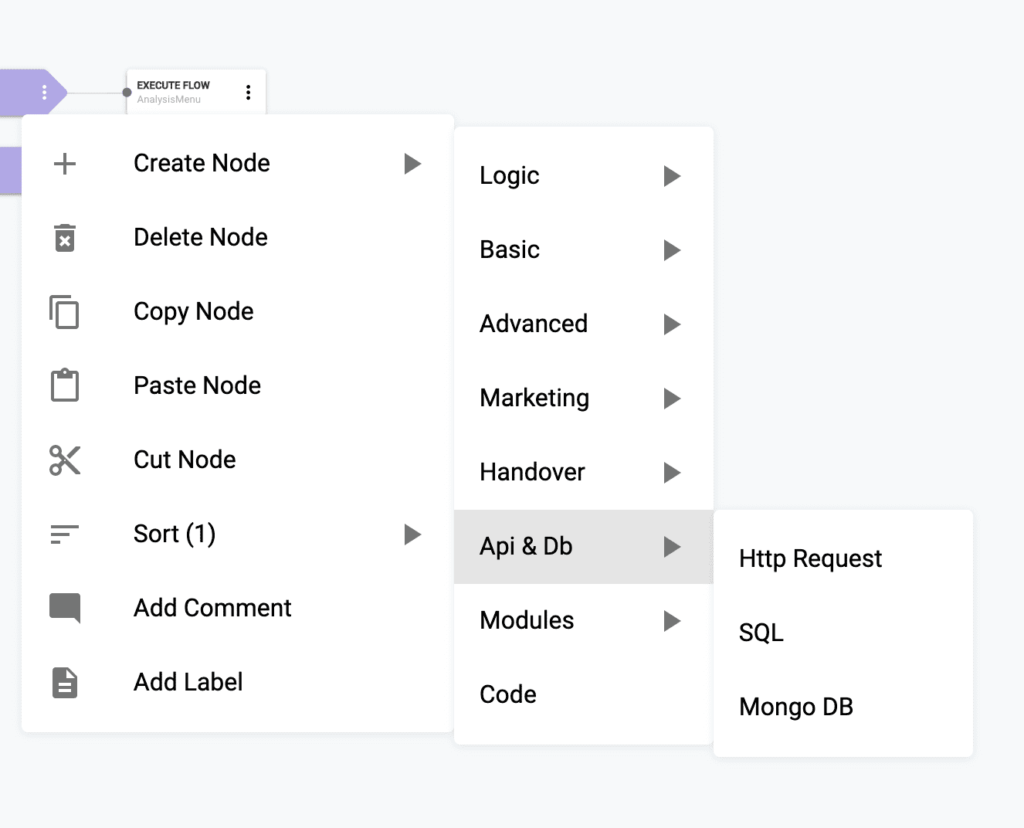
To compare, to add a new node in Cognigy one should press the three-dot button on the right side of the node, click on Create Node, and then the drop-down list of the available nodes will appear. Nodes are also grouped according to their functionality, and it won’t be an exaggeration to say they look far more thought out – you are able to tackle almost any tech, marketing, and business needs :
- Logic (if, once, switch case, interval, stop/pause/execute/switch flow, run process)
- Basic (say, think, questions (slot, y/n), add/remove from context, set state)
- Advanced (execute Cognigy NLP, blind mode, reset context, reset state, etc)
- Marketing (send email, date picker, activate/ deactivate/ update/ delete/ merge user profile)
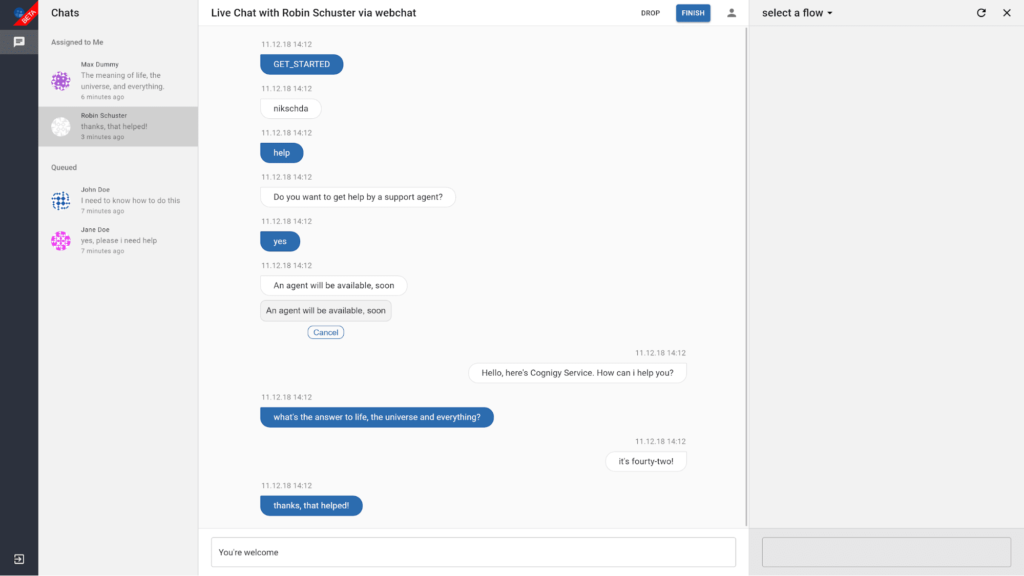
- Handover (= live support on, an assistant will connect ASAP from the Cognigy pre-built and very handy page )
- Api & DB (HTTP Request, SQL, Mongo DB)
- Custom Modules
- Code block
In Cognigy editor, not all nodes could be wired together, for example, IF nodes should always be followed with only THEN or ELSE nodes. This approach makes it easier to learn how to construct flows.
However, it feels like Cognigy misses the “continue flow” option – no way to pause and continue the flow at a specific moment.
In both environments, the labels might be used to customize the node “title” and describe its appointment for the rest of the team.
Cognigy vs Node-red: Integrations
Today one of the most important features that one platform should have is the ability to easily integrate and co-work with other software. As the article goes, we have already mentioned some other tools that work great with both platforms.
It goes without saying that Node-red’s greatest advantage is that it is compatible with almost everything. Here, we should note that some integrations require strong technical skills, but otherwise, with a help of documentation, all developers will enjoy their experience. Here is a small list of Node-red’s possible cooperation:
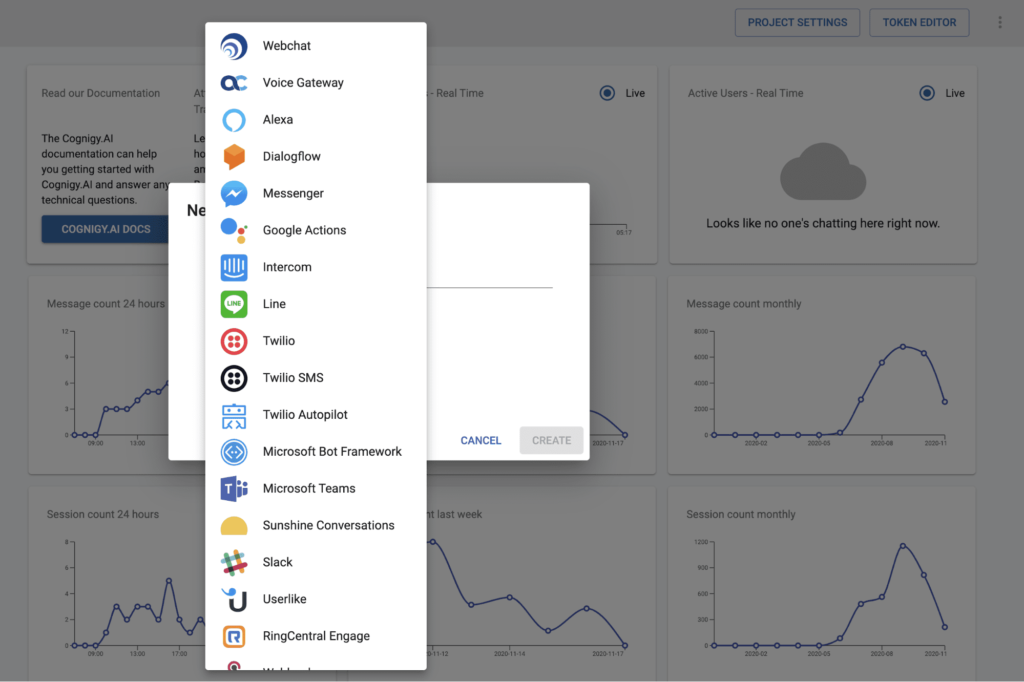
– messengers: Telegram, Viber, Facebook messenger, what’s up, slack, webpage chatbot integration (by using API’s or custom nodes)
- cloud platforms and databases: MongoDB, MySQL, Twilio, AWS, Kibana (by using API’s or custom nodes, IBM Watson, Google)
- local tunnels and servers: ngrok, localtunnel, Jenkins
- conversational AI (we will look at it closely in the following part)
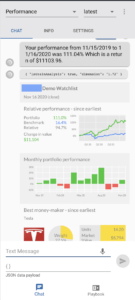
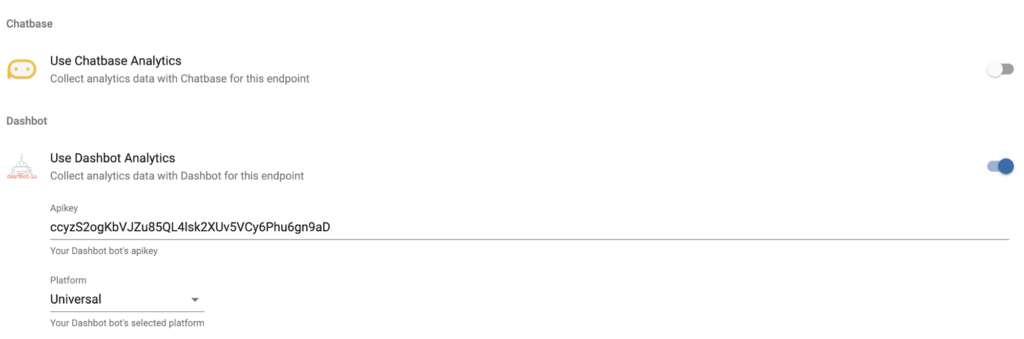
The same should be said about Cognigy – platform developers created direct integration tools with military precision. For each of the endpoints, there is the ability to configure a data management system, page setup, messenger settings, input/output handlers. The built-in graphical solutions such as Cognigy web and mobile chat widgets allow you to integrate seamlessly with your app, and provide your customers with Conversational AI via Cognigy. The direct integration with top analytics tools is also included there. Furthermore, Cognigy supports DB connections, which was displayed in the Nodes comparison paragraph. This is exactly the case when a screenshot says more than any other words:
Cognigy vs Node-red: NLU and languages support
Nowadays, NLU & NLP are of paramount importance as one of the most amazing technologies. For sure every user will be more satisfied if they feel like the product is personalized, won’t they? That’s where eye-catching tools called NLU & NLP comes in. The above-mentioned terms stand for Natural Language Understanding and Processing – so, when a user types something with the help of NLU, the chatbot is able to answer it by identifying the user’s intents and wishes. Sounds nice, right?
Node-red doesn’t contain NLU support itself, however, it opens a lot of opportunities for integrations. For instance, it supports integrations with Dialogflow that is one of the best NLU platforms now, developed by Google. It, also, enables the use of IBM Watson which can help not only in natural language recognition but also in the processing of visual and audio messages. It can be achieved by using APIs or already existing custom nodes.
Cognigy built-in NLU is claimed to be one of the most powerful nowadays – it allows us to understand what users say with patent-pending innovations and deep-learning algorithms. It truly can participate in the battle with Google Dialogflow or any other NLU “market” leader. As a default, Cognigy will handle all of your intent mapping needs, meaning that you define your intents as described in Intents. The platform also allows to train and perfect NLU right on their UI within the flow.
However, you can also choose to use an external NLU Provider in Cognigy to handle intent mapping, and connect them to Cognigy. These external NLU Connectors will generate the same input object as Cognigy, which enables you to easily switch NLU providers without having to change your flow. Cognigy currently supports connections to Dialogflow, LUIS, Watson, and Alexa Skills which you built with the Alexa skill builder. Finally, Cognigy supports 20+ languages, while machine learning models are language-independent.
Cognigy vs Node-red: CI/CD processes
Node-red’s deployment process depends on the environment one is using to create a flow. IBM Cloud allows you to host your project using their cloud services (the amount of possible hosted data depends on the plan). In case if you are working with it locally you can use any possible cloud service or platform that allows you to host your flow and enables uninterrupted work. Some of them we have already mentioned before in the article, like AWS.
One of the ways to work out the Cognigy project proper environment allocation and support (to make CI/CD alive) is to use their Import/Export feature within 2-3 organization projects. It allows the creation of a super-secure ZIP file with all the projects including flows (version choice available), processes, and all configurations, but avoiding endpoints setup.
Summary
Obviously, Conversational AI platforms are gradually engrossing attention, thus provoking a substantial alteration of chatbots concept perception. As a matter of fact, smart choice and use of conversational AI is an indispensable part of any successful tech project which allows businesses to boost confidence in the market as well as to keep pace with the Tech industry’s rapid development.
Both Node-RED and Cognigy pretend to be a wise choice for your digitization process – which one to choose depends on business needs and product growth perspectives. However, using Conversational AI capabilities and power to the fullest extent, as well as building scalable, flexible, and personalized tech solutions entails a full development cycle with proper CI/CD and delivery processes set.
The article contains a high-level overview of the main features and interface, a summary of which could be found on the comparison table below:
| Feature | Node-RED | Cognigy |
| Pricing | 100% Free (open-source project) | Free trial exists. No official starting price published. |
| Popularity | High | Medium |
| Created by | IBM (USA, billion corporation, 350k+ employees) | Cognigy (Germany, million-funding vendors, up to 100 employees ) |
| First launch date | July 6, 2016 – v0.14 | Jul 18, 2017 – v2.0 |
| Client Portfolio List | Sense Tecnic, Agilite, Go-IoT, Spirit, Opto 22 and many more | Daimler, Bosch, Lufthansa, Cisco, Salzburg AG and many more |
| Partner Network | Nothing mentioned so far. Only IoT monitor tool suggests Node-Red connector – more here. | Yes, quite huge. You can also find or become a partner. |
| Documentation quality | High, but no versions support | High, with versions support |
| How to’s & Tutorials | Yes, rich – componential approach | Yes, rich – full project approach |
| Help center & Support | None, only blog and forum or npm support | Very good – always answer emails shortly – post alerts about environment updates in advance – during video calls dive into the specific feature and assist in finding tech solutions |
| Community & forums discussions | Forum, active Slack team channel | Community page – active, but small amount of posts |
| Meetups and events | Often, worldwide | Webinars & Conferences, Trainings |
| Udemy courses | Yes, almost 6k videos | Yes, only 2 for today from Derek Roberti ( VP Technology, North America at Cognigy ) |
| Contribution | Yes, many ways | Yes, one way |
| Social media activity | Official blog, Facebook, Twitter, GitHub, Wikipedia | Official blog, Facebook, Twitter, Github |
| Stable releases | Yes, Node-RED release notes | Yes, Cognigy release notes |
| As-a-service concept | PaaS (Platform as a Service) | SaaS (Software as a service) |
| Installations guides variety | Very rich | Simple, free trial registration page |
| Local copy support | Yes, docs Node.js pre-installation required | Yes, CLI docs Node.js pre-installation required |
| Platform runtime | Node.js – lightweight, event-driven, non-blocking | Node.js – lightweight, event-driven, non-blocking |
| NPM support | Yes | Yes |
| Hardware support | Yes (i.e. Raspberry PI) | No |
| Supports IoT solutions | Yes – one of the best solutions for IoT projects | No |
| Cloud environment | IBM (Bluemix), AWS, MS-Azure, etc | Cognigy SaaS cloud or on-premise development |
| Flow editor in .. | Web | Web |
| Flow chains layout | Left to right | V3: Left to right V4: Top to bottom |
| UI Interface convenience level | High | High Minor disadvantage: no chance to bulk choose/cut/copy/paste nodes. Only single action available, which is time-consuming. |
| UI bugs | None | Very minor |
| Native logging – live? | Yes | Yes (+ can be turned off) |
| Native logging – filter and search tool | Low: none built-in exists | Medium: includes some, but UI misses the logs flow separation for each Project in organization |
| Native logging – log levels | Info,debug,error + fatal, warn, trace, off | Info,debug,error |
| Metadata | JSON | JSON |
| Logger customization | Easy | Hard |
| Chatbot user profile page | No | Yes Major advantage: powerful enough, assists in user management process, is easily customized, speeds up the chatbot performance |
| Session management page | No | Yes Major advantage: Minor advantage: Cognigy has global TTL set to 30 days: this implies deleting profiles and sessions of users that were inactive for > 30 days. |
| Handover (live support) | No | Yes Major advantage: support and control live conversations without any additional development. Medium disadvantage: allows to interfere in conversation only by user request. However, this can be evaded. |
| Management UI | No | Yes Medium advantage: to some extend equates to super-admin tool to set organization configuration |
| Access control | No | Yes
Medium disadvantage: allows to set the access rights to the group of projects, rather then attach rights to each project separately. |
| Open API | No | Yes (docs). Major advantage: allows to send messages to users, imitates user actions, manage user profiles, their sessions without using UI. |
| Automated testing | No | Yes Major advantage: allows to ensure that business objectives are still met after changes have been made |
| Unlimited scalability | Yes (if it is designed as a stateless app) | Yes (due to containerized microservices architecture (Kubernetes)) |
| Provides unlimited scaling and built-in resilience to handle peak traffic loads. | ||
| Flow versioning | Yes, through GitHub built-in interface | Yes
Major advantages: 1. Flows history management 2. Locked versions take less time to load and therefore perform better under heavy load
Medium disadvantage: |
| Import/Export tools | Yes | Yes Medium disadvantage: no bulk actions supported for now. |
| Databases integration | Yes, through libraries. Both SQL and non-SQL supported. | Yes, built-in Both SQL and non-SQL supported. |
| Caching tools | No | Yes Major advantage: allows to store request responses in cache and control their expiration time. |
| Messengers direct integration | No Solution: install custom nodes or use Messenger API directly. | Yes, a wide range |
| Ready webchat widget | No | Yes Major advantage: fast release of beta version for your business Major disadvantage: non-customized, so that limits business product growth |
| Ready mobile widget | No | |
| NLU direct Connectors | No Solution: install custom nodes or use your API, that accesses NLU modules | Yes Dialogflow, LUIS, Watson and Alexa Skills |
| Custom NLU engine | No | Yes Major advantage: it is a conversation platform built-in tool, which allows BA and Flow developers to build the best solution fast. Finally, NLU can be trained directly within the Cognigy project. |
| Built-in intents analytics | No | Yes |
| Direct multi-language support | No | Yes, more than 20+, machine learning models are language-independent |
| Built-in analytics and business intelligence | Yes – dashboard | Yes – dashboard |
| Complex flows “glue” concept | Multi-page approach | Multi-flow approach |
| Basic input/output nodes | Yes | Yes |
| Voice to text / text to voice | Yes – upcoming trend btw | Yes – upcoming trend btw |
| Marketing nodes | No | Yes Medium advantage: enables sending emails and user profile management tools through UI |
| Rich network nodes | Yes | Yes |
| Parser nodes | Yes Major advantage: allows to process cvs, html, json, xml, yaml files fast | No |
| Sequence nodes | Yes Major advantage: allows to manipulate data – split, join, sort, batch | No, manipulate with data only within Code blocks |
| Storage nodes | Yes | No |
| Custom modules support | Yes | Yes |
| Rich library with packages | Yes Major advantage: community always publish various Node-RED solutions and utils, which may become nice part of your project | No |
| Ability to write code | Yes, Javascript | Yes, Javascript |
 Top Chatbot Benefits [How Chatbots Improve Cross-Selling]
 Marketing for Chatbot Development Companies [21 Places to Share Content]
 10 Chatbot Uses in Retail [Industries, Cases, Benefits]
 How to Get The Job in Chatbot Development Agency [Platforms, Places, Websites]